How to transfer your YouTube Music, Apple Music, and other playlists to Spotify: A step-by-step guide


Switching music streaming services just got easier. Spotify has rolled out a built-in feature that lets users import playlists from competing platforms directly through its mobile app, eliminating the need for workarounds or third-party subscriptions.The feature supports major services including Apple Music, Amazon Music, YouTube Music, SoundCloud, TIDAL, Pandora, and Deezer. Best of all, your original playlists stay intact — this only creates copies in Spotify.
How to transfer your playlists to Spotify
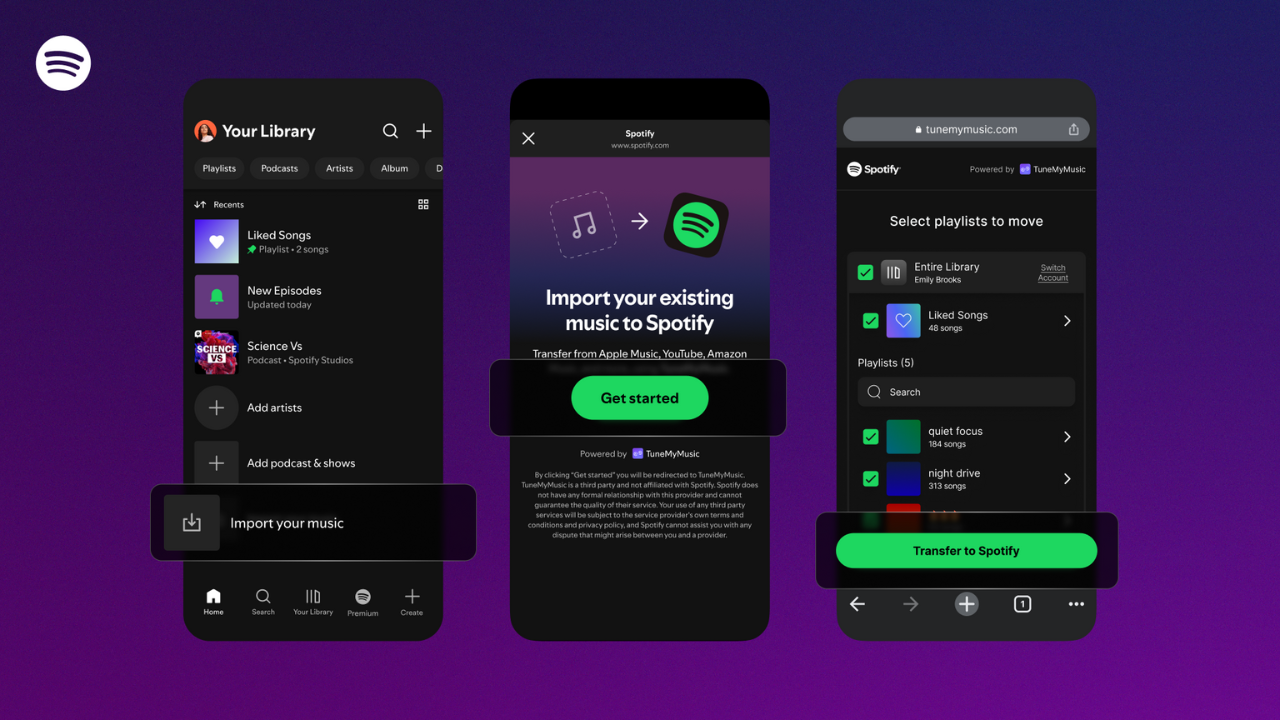
Here’s a step-by-step guide on how to move your playlists:
- Open the
Spotify mobile app and navigate to “Your Library.” - Scroll to the bottom until you see the new option.
- Tap “Import your music” and follow the on-screen prompts.
- Connect with TuneMyMusic when prompted.
- Select the streaming platform you want to transfer from.
- Choose which playlists you’d like to bring over.
- Watch them appear in your Spotify library within moments.
The feature is rolling out globally over the coming days, so if you don’t see it yet, check back soon.
How this feature is useful for Spotify users
One bonus: the free online version of TuneMyMusic only transfers 500 tracks, but Spotify’s built-in integration removes that limitation. That’s particularly useful if you’ve spent years building extensive playlists.Once your playlists arrive, Spotify’s personalisation engine starts learning your taste immediately, which means features like daylist and Release Radar will feel relevant much faster for new users.The move intensifies competition in the streaming wars. Apple Music already offers similar functionality through iOS and iPadOS settings, while YouTube Music Premium subscribers can also import playlists from other services.Missing tracks can still happen when different services’ catalogs don’t perfectly align, but for most users, the transfer process now takes just a few taps. No more manually rebuilding years of musical curation or paying for separate transfer tools.